
Elo Self-Service & Kiosk Hardware
Customer-facing kiosk hardware for self-ordering, self-checkout, and interactive service.
Elo self-service and kiosk hardware is designed for businesses that want to give customers a faster, clearer, and more independent service experience. These solutions can support self-ordering, self-checkout, check-in, queue support, product lookup, and other customer-facing workflows.
They are a strong fit for restaurants, hotels, quick-service locations, retail stores, service counters, events, and high-traffic environments where customers need a clear digital touchpoint.
Solutech helps select, supply, install, configure, and support Elo kiosk hardware as part of a complete POS and business hardware environment across Curaçao and the Caribbean.
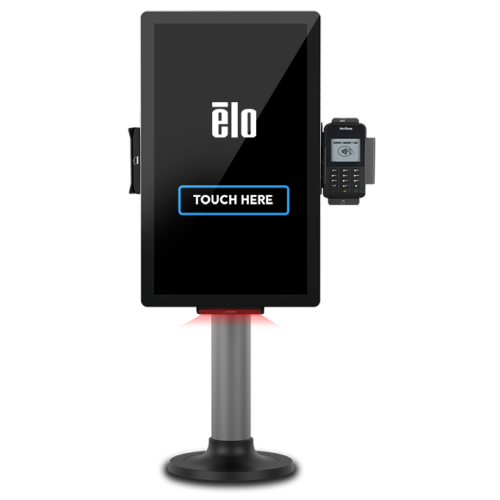
- Self-service kiosk hardware
- Ordering and checkout workflows
- Customer-facing interaction
- Installed & supported by Solutech
Self-service hardware for smoother customer flow
Elo self-service and kiosk hardware helps businesses reduce counter pressure, improve customer flow, and support digital interaction points. Depending on the setup, kiosks can be used for ordering, checkout, check-in, product lookup, queue management, and customer assistance.
Best suited for
- Quick-service restaurants
- Hotels and resorts
- Retail stores
- Cafés and grab-and-go counters
- Food courts
- Service counters
- Events and venues
- High-traffic customer environments
Built for customer-facing self-service
Self-ordering and checkout
Kiosk hardware can support customers placing orders, reviewing items, and completing checkout through a guided digital flow.
Check-in and customer service
Self-service screens can be used for guest check-in, queue support, information lookup, customer registration, or service desk workflows.
Retail and product interaction
Kiosks can support product browsing, price lookup, customer assistance, digital catalogs, and interactive retail experiences.
The kiosk needs to match the full workflow
A self-service kiosk needs to work with the POS software, payment setup, network, mounting, customer interface, peripherals, and daily operational process. Solutech helps check the full setup before installation.
POS and business software compatibility
The kiosk must work smoothly with the POS or business software in use, including menu structures, pricing, order flow, and service rules.
Payment, scanning, and peripheral setup
Payment terminals, scanners, printers, and other peripherals need to be connected and configured to fit the self-service workflow.
Placement, mounting, and customer-flow planning
Placement, mounting, accessibility, and customer flow around the kiosk all shape whether the setup actually improves service.
Professional kiosk hardware for customer-facing use
Hardware features
- Self-service and kiosk hardware options for business use
- Suitable for ordering, checkout, check-in, and customer interaction
- Can support hospitality, retail, food service, and service-counter workflows
- Can be combined with payment devices, scanners, printers, stands, mounts, and accessories
- Useful for high-traffic environments and customer-facing service points
- Helps reduce pressure on fixed counters and staff
- Designed for daily commercial use
- Supported locally by Solutech
Solution overview
- Product type
- Self-service and kiosk hardware
- Primary use
- Self-ordering, self-checkout, check-in, product lookup, and customer interaction
- Best suited for
- Restaurants, hotels, retail stores, quick-service locations, food courts, events, and service counters
- Setup options
- Freestanding, countertop, wall-mounted, customer-facing, or integrated kiosk setup depending on configuration
- Peripheral use
- Can be combined with payment terminals, scanners, printers, cameras, mounts, stands, and accessories
- Support
- Supplied, installed, configured, and supported by Solutech
Local advice, installation and support
Choosing the right Elo self-service or kiosk setup is only part of the solution. Solutech helps select the right hardware, supply the equipment, install and configure the setup, connect peripherals, and provide local support after deployment.
- Kiosk hardware selection
- Installation & configuration
- Peripheral and workflow setup
- Local support
Explore Oracle MICROS Hardware
Workstations, tablets, kiosks, kitchen displays, and POS peripherals for Oracle Simphony environments.
View Oracle productsExplore PartnerTech Hardware
POS terminals, mobile POS, self-service, kitchen displays, customer displays, and peripherals.
View PartnerTech productsLet Solutech help you choose the right Elo kiosk solution.
Whether you need self-ordering, self-checkout, check-in, customer interaction, product lookup, or queue support, Solutech can help you choose and configure the right Elo kiosk setup.
Elo is a product line from Elo Touch Solutions. Solutech provides local advice, hardware supply, implementation, installation, configuration, and support. Product names and trademarks belong to their respective owners.