
Elo Touchscreen Monitors
Professional touchscreen displays for POS, retail, hospitality, and service environments.
Elo touchscreen monitors are designed for businesses that need reliable interactive displays for POS stations, service counters, customer-facing setups, retail environments, and hospitality workflows.
They can be used as staff-facing screens, customer-facing displays, order screens, checkout monitors, or interactive touchpoints depending on the setup.
Solutech helps select, supply, install, configure, and support Elo touchscreen monitors as part of a complete POS and business hardware environment across Curaçao and the Caribbean.
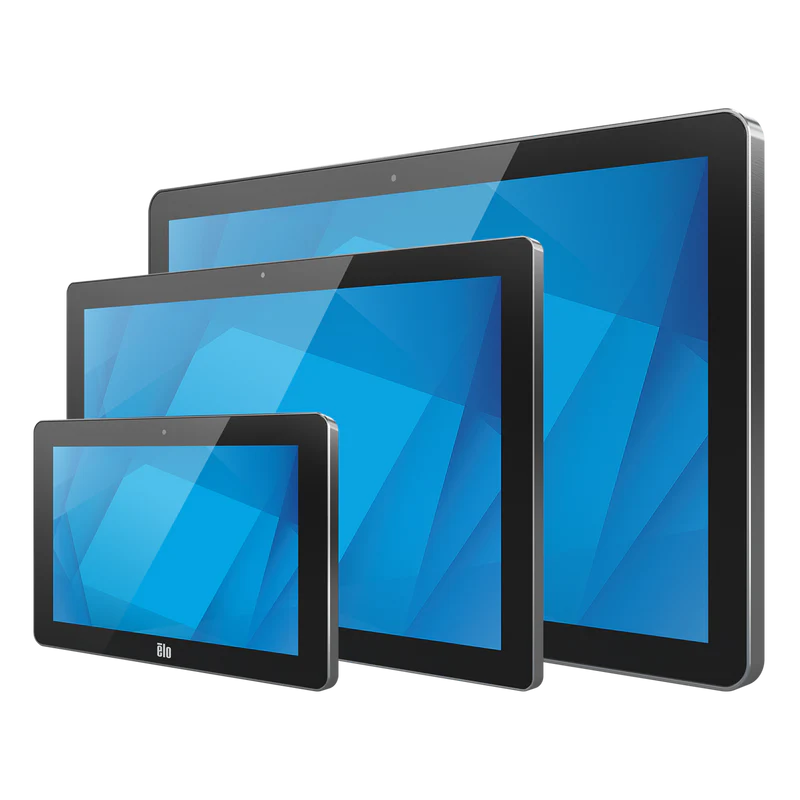
- Touchscreen display solutions
- POS and service counter use
- Staff or customer-facing setups
- Installed & supported by Solutech
Touchscreen monitors for clear and flexible interaction
Elo touchscreen monitors give businesses a flexible display option for POS, retail, hospitality, service counters, customer interaction, and back-office workflows. They can support both staff-facing and customer-facing use, depending on the software, mounting, peripherals, and operational setup.
Best suited for
- Restaurants
- Hotels and resorts
- Cafés and bars
- Retail stores
- Service counters
- Customer-facing displays
- Reception desks
- Interactive business workstations
Built for interactive business environments
POS and service counters
Touchscreen monitors can support order entry, checkout, service workflows, and staff-facing business applications.
Customer-facing interaction
They can be used to show order details, customer information, digital prompts, or interactive service flows.
Flexible display setups
Touchscreen monitors can be combined with mounts, stands, workstations, peripherals, and business software depending on the environment.
The display needs to match the full environment
A touchscreen monitor needs to work properly with the workstation, operating system, POS software, mounting setup, cables, power, peripherals, and daily workflow. Solutech helps check the full environment before installation.
POS and business software compatibility
The monitor must work smoothly with the POS or business software in use, including touch response, resolution, and interface behavior.
Mounting and counter layout planning
Placement on counters, desks, poles, walls, or customer-facing positions needs to be planned around the workflow and available space.
Peripheral and cabling setup
Cables, power supplies, connected peripherals, and workstation compatibility all need to be considered for a clean installation.
Professional touchscreen displays for daily commercial use
Hardware features
- Touchscreen monitor options for business use
- Suitable for staff-facing and customer-facing setups
- Works with POS, retail, hospitality, and service workflows
- Can be combined with mounts, stands, peripherals, and payment devices
- Useful for counters, reception desks, checkout areas, and customer interaction points
- Flexible installation depending on the environment
- Designed for daily commercial use
- Supported locally by Solutech
Solution overview
- Product type
- Touchscreen monitors
- Primary use
- Interactive display, POS display, customer-facing display, and service workflows
- Best suited for
- Hospitality, retail, restaurants, hotels, cafés, bars, reception areas, and service counters
- Setup options
- Counter, desk, wall, pole, customer-facing, or workstation-based setup depending on configuration
- Peripheral use
- Can be combined with POS terminals, printers, scanners, customer displays, payment terminals, and accessories
- Support
- Supplied, installed, configured, and supported by Solutech
Local advice, installation and support
Choosing the right Elo touchscreen monitor is only part of the solution. Solutech helps select the right display setup, supply the hardware, install and configure the equipment, connect peripherals, and provide local support after deployment.
- Display selection
- Installation & configuration
- Mounting and peripheral setup
- Local support
Explore Oracle MICROS Hardware
Workstations, tablets, kiosks, kitchen displays, and POS peripherals for Oracle Simphony environments.
View Oracle productsExplore PartnerTech Hardware
POS terminals, mobile POS, self-service, kitchen displays, customer displays, and peripherals.
View PartnerTech productsLet Solutech help you choose the right Elo display.
Whether you need touchscreen monitors for POS, customer interaction, checkout, reception, service counters, or hospitality workflows, Solutech can help you choose and configure the right setup.
Elo is a product line from Elo Touch Solutions. Solutech provides local advice, hardware supply, implementation, installation, configuration, and support. Product names and trademarks belong to their respective owners.